
Table of Contents
TON Timer is one of the Timer function in Sysmac Studio. Timer functions in Sysmac Studio are used to control time dependent operations. For example, if we want an output to be activated 2 seconds after certain conditions are met, we can easily do this with a Timer function.
There are 5 types of Timer Functions in Sysmac Studio. These;
- TON (On-Delay Timer)]
- TOF (Off-Delay Timer)
- TP (Timer Pulse)
- AccumulationTimer
- Timer (Hundred-ms Timer)
TON Timer (On-Delay Timer)
Ladder Diagram :

Structured Text (ST) :
TON_instance (In, PT, Q,ET);
| Input/ Output | Meaning | Açıklama | Valid Range | Unit | |
|---|---|---|---|---|---|
| In | Input | Timer Input | TRUE : Timer start signal FALSE : Timer reset signal | TRUE or FALSE | — |
| PT | Input | Set Time | Time from when timer starts until Q changes to TRUE | T#0 ms to T#106751d_23h_47m_ 16s_854.775807ms | ms |
| Q | Output | Timer Output | TRUE : Timer output ON FALSE : Timer output OFF | TRUE or FALSE | — |
| ET | Output | Elapsed Time | Time from when timer starts until Q changes to TRUE | T#0 ms to T#106751d_23h_47m_ 16s_854.775807ms | ms |
After the In input is activated, the Q output becomes active as much as the value written to the PT input. The duration of the timer can be followed from the ET output.

A 5-second TON is used in the GIF above. 5 seconds after the A contact is triggered, the abc output has become active. After the TON Timer is active, how much time has passed can be followed from the def variable. After A contact became FALSE, abc output also became FALSE.
But what if contact A had gone FALSE before 5 seconds had elapsed?

As can be seen from the variable def, A contact has switched to FALSE state at about 4 seconds of TON Timer. In this case, the abc output was never active and the def variable was reset and the TON Timer was reset.
Timing Diagram
The TON Timer outputs TRUE when the set time elapses after the timer starts. The time is set in nanoseconds.
The timer starts when timer input In changes to TRUE. Elapsed time ET is incremented as time elapses.
When ET reaches set time PT, timer output Q changes to TRUE. ET is not incremented after that.
The timer is reset when In changes to FALSE. ET changes to 0, and Q changes to FALSE.
If In changes to FALSE after the timer is started, the timer is reset even before ET reaches PT.
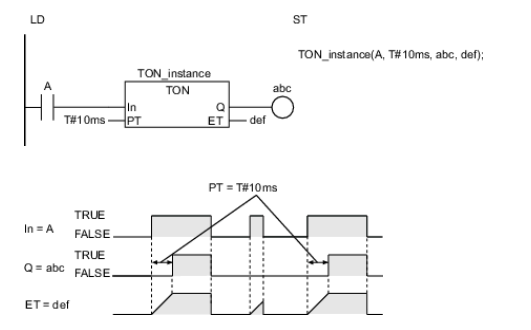
The following figure shows a programming example and timing chart for a PT of T#10 ms. Variable abc will change to TRUE 10 ms after variable A changes to TRUE.
Things to Pay Attention
- The timing error for which Q is TRUE for PT is -100 ns to (100 ns + 1 task period). The above range includes the following:
- The ±100 ns is the timing error of ET.
- Time ET is judged to check if it reaches PT every task period. If time ET reaches PT immediately after the judgment is completed, there is a delay of one task period.
- The time is displayed in increments of 0.001 ms on the Sysmac Studio, but the timing accuracy is 1 ns.
- The timer starts as soon as operation starts if In is already TRUE.
- If T#0 ms or a negative number is set for PT, Q will change to TRUE as soon as the value of In changes to TRUE.
- You can change the value of PT while the value of In is TRUE. Operation is as follows:
| Timer Status | Value of Q | Value of PT after it is changed | Operation |
|---|---|---|---|
| After completion of timing | TRUE | — | The value of Q remains TRUE. The value of ET also does not change. It remains at the same value of PT as before it is changed. |
| Timing in progress | FALSE | PT≥ ET | Timing is continued. When the value of ET reaches the value of PT, the value of Q changes to TRUE and ET is no longer incremented. |
| Timing in progress | FALSE | PT< ET | The value of Q changes to TRUE immediately. Incrementing ET stops immediately. |
- If this instruction is in a master control region and the master control region is reset, the timer is reset. The value of ET changes to 0, and the value of Q changes to FALSE.
- If this instruction is used in a ladder diagram, the value of Q changes to FALSE when an error occurs in the previous instruction on the rung.